

Festival season puts D2C operations under a kind of pressure that normal growth never does. Order volumes spike unpredictably, customer expectations rise, and even small process gaps get amplified across fulfilment, support and last-mile delivery. For many teams, the challenge is not demand itself, but the inability to absorb sudden surges without costs, delays or service degradation.
The Role of Automation in Handling Festival Season Surges looks at how automation helps D2C brands in India scale operations during peak periods without relying entirely on manual firefighting. It focuses on the operational choke points that typically break under festival load — order processing, inventory updates, customer communication, routing and exception handling — and explains where automation creates the most leverage.
Rather than framing automation as a technology upgrade, this blog treats it as a capacity-balancing tool. The goal is to show how targeted automation absorbs volatility, protects service levels and allows teams to focus on exceptions, not routine work, when volumes surge the most.
What is Ecommerce Automation for Festival Season Surges?
Ecommerce automation for festival season surges refers to the use of rule-based systems and integrated workflows to handle sudden spikes in order volume, customer queries, and logistics operations without manual intervention.
During peak periods like Diwali or festive sales, order volumes can increase sharply within a short time window, putting pressure on fulfilment, inventory, support, and delivery systems.
Automation acts as a capacity-balancing layer, allowing operations to scale without proportionally increasing team size or manual effort.
At an operational level, automation focuses on high-volume, repeatable decisions across the order lifecycle.
Key areas typically automated include:
- Order processing and validation
Automatically verifying orders, flagging high-risk COD transactions, and prioritising fulfilment based on predefined rules - Inventory allocation and routing
Dynamically assigning orders to warehouses or carriers based on stock availability, location, and load balancing - Customer communication
Triggering real-time updates such as order confirmation, dispatch, out-for-delivery, and delay notifications - Carrier selection and dispatch workflows
Assigning logistics partners automatically and generating shipping manifests without manual coordination - Exception detection and escalation
Identifying delayed shipments, failed delivery attempts, or stockouts and routing them for resolution
The core principle is that automation handles routine, rule-based decisions at scale, while human teams focus on exceptions and complex cases.
From a business perspective, this directly impacts:
- SLA adherence during high-volume periods
- Support load, by reducing inbound queries through proactive updates
- Operational cost per order, by limiting the need for temporary staffing
- Error rates, by removing manual inconsistencies
Without automation, festival demand amplifies small inefficiencies into large operational bottlenecks. With automation, the same demand can be absorbed with consistent execution, faster decision-making, and controlled costs.
Why Do Manual Processes Fail During Festival Season Surges?
Human decision-making doesn't scale linearly—automation does
Manual processes work when order volume is predictable and manageable. Your ops team can review orders one by one, decide which to prioritise, allocate inventory intelligently, and handle exceptions personally. But during festival surges, decision volume overwhelms human capacity. Your team receives 3,500 order decisions in a day instead of 200. Each decision takes the same time, but there aren't enough hours or people.
The second failure point is inconsistency. Different team members make different decisions. One person prioritises high-value orders. Another prioritises first-in-first-out. A third prioritises orders from repeat customers. Without standardised rules, your operations become chaotic. Customers with identical orders placed at the same time experience wildly different fulfilment speeds.
The third issue is latency. Manual processes introduce delays at every step. Inventory allocation waits for someone to check stock levels. Order routing waits for someone to assign carriers. Exception handling waits for someone to read the ticket and decide what to do. During normal periods, these delays are acceptable. During surges, they compound into multi-day backlogs.
The fourth problem is burnout. Your team works 12-hour days for two weeks straight, makes exhausted mistakes, and quits after the season ends. You lose institutional knowledge and start the next surge with new, untrained staff. Manual operations aren't just inefficient during surges—they're unsustainable.
Which Ecommerce Processes Should Be Automated First
Not everything needs automation—focus on high-volume, rule-based decisions
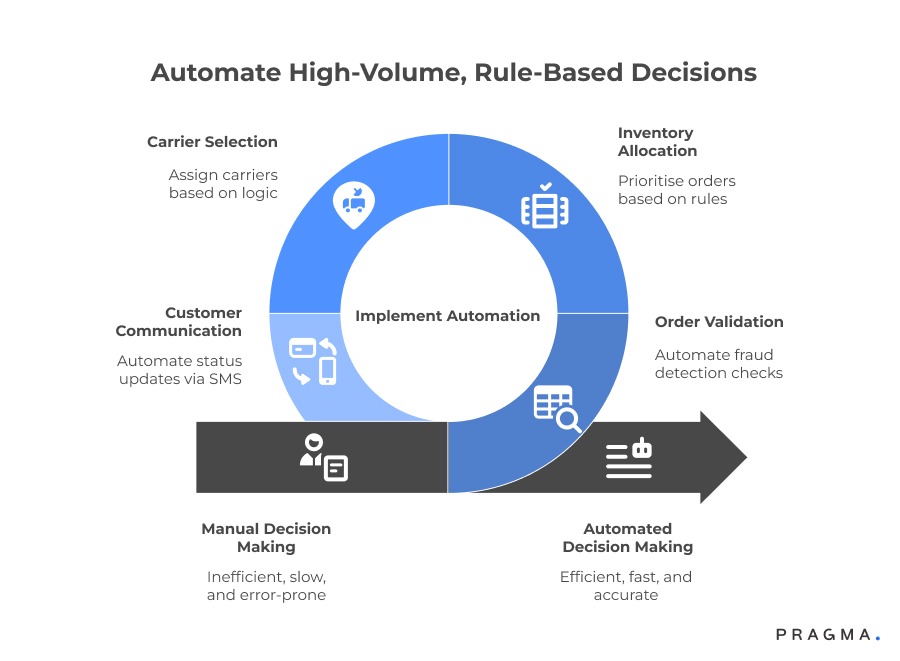
Key Automation Targets for Festival Season Order Surges
Festival surges see a corresponding spike in fraud attempts. Manual review is not feasible. Automate validation checks to instantly flag high-risk orders:
- Block orders from known blocklisted phone numbers.
- Flag high-value Cash on Delivery (COD) orders (e.g., above ₹5,000) placed by new customers in high-Return to Origin (RTO) pincodes.
- Identify and flag orders where the billing and shipping addresses do not match.
- Detect and flag multiple orders placed from the same IP address within a short timeframe (e.g., 30 minutes).
1. Inventory Allocation
When demand outstrips supply (e.g., 500 orders for 200 units), an automated system must decide fulfilment priority to avoid arbitrary decisions and customer frustration. Allocate inventory based on defined rules:
- Prioritise prepaid orders over COD.
- Prioritise repeat, loyal customers over new customers.
- Give preference to orders from pincodes with historically low RTO rates.
- Within the same priority tier, fulfil orders that were placed earliest.
2. Carrier Selection and Routing
Manually assigning carriers for thousands of daily orders is highly inefficient, given the varying serviceability, pricing, and Service Level Agreements (SLAs) of different partners. Automate carrier assignment using smart logic:
- Assign orders to the carrier that has the best on-time delivery rate for the specific destination pincode.
- Implement volume balancing to distribute orders evenly and prevent any single carrier from becoming overwhelmed.
- Route high-value shipments to carriers known for lower loss rates.
- Automatically escalate and route unserviceable pincodes to designated backup carriers.
3. Customer Communication
During peak periods, customer queries about order status ("When will it ship?", "Where is my package?") surge, resulting in slow, 2–4 hour manual response times. Automate proactive status updates to reduce inbound queries significantly (by up to 60%):
- Send automated SMS updates immediately upon order confirmation.
- Send alerts when the order is packed and ready.
- Notify the customer when the order is shipped.
- Provide an alert when the package is out for delivery.
- Communicate proactively if an order is delayed.
Processes You Shouldn't Automate (Yet)
Exception handling for complex issues shouldn't be automated. Customer wants to cancel after shipping, address is incomplete and needs clarification, product was damaged in transit—these need human judgment. Automate the triage (flag the exception, route to the right team member), but keep the resolution human.
High-value customer interactions shouldn't be automated. Your top 5% of customers by lifetime value deserve personalised attention. If a customer who's spent ₹50,000 with you messages during a surge, a human should respond within 30 minutes, not an automated chatbot.
Product quality decisions shouldn't be automated. If your warehouse team notices a batch defect during packing, they need authority to halt shipments and alert you. Automation should support these decisions, not override human quality control.
How Do You Build Automation Without Disrupting Current Operations?
Implementing automation during festival season is disaster—build it two months before
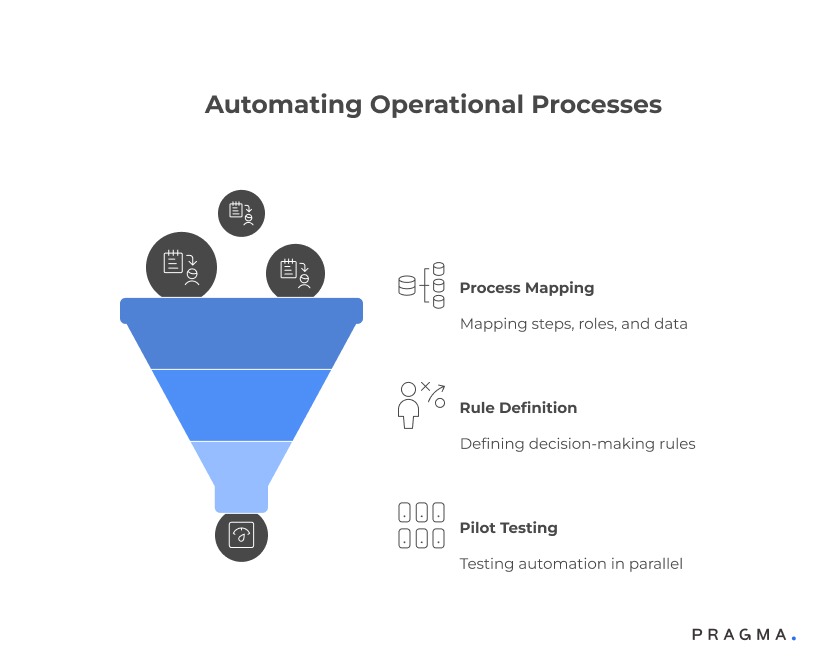
Start automation implementation 8–10 weeks before your peak season. This gives you time to build, test, and fix issues before order volume spikes. Implementing automation during the surge itself guarantees failures when you can least afford them.
Phase one is process mapping
Document every manual step in your current workflow. Order placement to validation. Validation to inventory check. Inventory check to packing. Packing to carrier assignment. Carrier assignment to dispatch. Exception detection to resolution. Map who does what, how long each step takes, and what data is required for decisions.
Phase two is rule definition
For each manual decision point, define the rules a system would use. How do you currently decide which orders to prioritise? Write it as a formula: (Order value × 0.3) + (Customer lifetime orders × 0.2) + (Payment mode: prepaid = 10, COD = 0) + (Pincode RTO rate: inverse scale) = Priority score. Now automation can replicate your decision-making at scale.
Phase three is pilot testing
Pick one process to automate first—usually order validation or carrier selection. Run it in parallel with your manual process for two weeks. Compare outcomes. Did automation flag the same fraud orders you would have caught manually? Did it route orders to the right carriers? Tune the rules until automated decisions match or exceed human decisions.
Integrating Automation with Existing Tools
Your OMS, WMS, and carrier integration platform need to talk to each other. Most automation failures happen at integration points—data doesn't flow cleanly between systems, or flows with delays that negate automation benefits.
Use APIs to connect systems in real time. When an order is placed, your OMS should immediately call your inventory system to check stock, call your fraud detection system to validate the customer, and call your carrier selection system to assign a shipping partner. This should happen in under 3 seconds, not 30 minutes.
If your current systems don't support API integrations, consider middleware platforms that sit between your tools and orchestrate data flow. Platforms like Zapier or Make work for low-volume operations, but at 3,000+ orders per day, you need enterprise integration tools or custom-built middleware.
Build fallback mechanisms for automation failures. If your automated carrier selection fails (API timeout, system error), what happens? Orders shouldn't sit in limbo. Default to a manual assignment process or a pre-defined backup carrier. Automation should make operations resilient, not fragile.
What Does Festival-Ready Inventory Automation Look Like?
Stock visibility and allocation logic determine whether you fulfil orders or disappoint customers
Real-time inventory tracking is non-negotiable. Your system must know exactly how many units of each SKU are available at any moment. Not "approximately 50 units"—exactly 47 units after accounting for reserved stock, damaged stock, and in-progress packing. Manual inventory counts updated twice daily don't work during surges.
Implement reserve inventory logic. When a customer places an order, the system immediately reserves that inventory for 15 minutes. If payment fails or the customer abandons, the reservation releases automatically. This prevents overselling—200 units shown as available, but 500 orders placed because the system didn't reserve inventory during checkout.
Build safety stock buffers into automation rules. If you have 100 units of a product, don't make all 100 available for sale. Reserve 5–10 units as safety stock for handling returns, exchanges, or manufacturing defects discovered during packing. Selling to 100% capacity leaves no room for operational reality.
Automate low-stock alerts. When a SKU drops below 20% of its festival forecast, your system should alert your procurement team immediately. Don't wait for manual checks. During Diwali week, waiting 24 hours to reorder means losing 3 days of sales.
Dynamic Stock Allocation Across Warehouses
If you operate multiple warehouses or use 3PL partners, inventory allocation becomes complex. A customer in Mumbai orders a product you stock in both your Delhi and Pune warehouses. Which location fulfils the order? Manual decisions consider only distance. Automation considers distance, current processing time at each warehouse, carrier serviceability from each location, and inventory levels.
Set allocation rules: prioritise the warehouse closest to the customer if both warehouses have inventory and similar processing times. If the closer warehouse is overloaded (200 orders in queue) and the farther warehouse is idle (20 orders in queue), route to the farther warehouse. If one warehouse has only 5 units left and heavy order flow for that product, reserve those units for local customers and route distant orders to other warehouses.
Update allocation rules daily during festival season. Monday's optimal allocation logic might not work by Thursday if order patterns shift. Review which warehouses are processing fastest, which are accumulating backlogs, and adjust allocation algorithms accordingly.
How to Automate Carrier Selection and Load Balancing
Manually assigning 3,500 orders across four carriers is impossible—automation is essential
Automating Carrier Selection and Load Management for Surge Capacity
To effectively manage high-volume periods like festival seasons, logistics automation should focus on intelligent carrier selection, dynamic load balancing, and seamless communication.
1. Intelligent Carrier Selection
- Required Data Inputs: The automation system needs three core data sets:
- Serviceability: Which specific pincodes each carrier covers.
- Performance: Recent historical data (e.g., last 30 days) on-time delivery (OTD) rate and Return-to-Origin (RTO) rate, segmented by pincode.
- Capacity: Real-time data on the carrier's current load and daily pickup limits.
- Selection Algorithm Logic:
- For every order, identify all carriers that service the destination pincode.
- From the serviceable carriers, prioritise the one with the best OTD rate for that specific pincode.
- Check if the preferred carrier has available daily pickup capacity.
- If the top carrier is at capacity, automatically reroute the order to the next best-performing carrier.
- If all preferred carriers are at maximum capacity, the order should be queued for the very next available pickup slot.
2. Dynamic Load Balancing
- Preventing Overload: Standard volume distribution models (e.g., giving Carrier A 70% of normal volume) will fail during a 5X surge. Such a surge would result in 3.5X the carrier's normal volume from your brand alone, plus surges from their other clients, leading to systemic failure.
- Strategic Distribution: Actively distribute volume across multiple partners to manage surge capacity. A suggested initial distribution for a surge scenario could be: Carrier A (40%), Carrier B (30%), Carrier C (20%), and Carrier D (10%).
- Performance-Based Adjustments: Continuously monitor carrier performance during the surge and adjust these distribution percentages weekly to shift load toward partners demonstrating the best execution.
3. Automated Carrier Communication
- Streamlined Handoff: Eliminate manual intervention for post-selection tasks. When the system assigns a batch of orders (e.g., 500) to a carrier, it must automatically generate the shipping manifest, upload it directly to the carrier's portal, and schedule the pickup.
- Benefits: Carriers value structured, predictable data flows, as this efficiency allows them to better plan and execute their own logistics operations.
Handling Unserviceable Pincodes Automatically
During surges, carriers start marking pincodes as "temporarily unserviceable" due to overload. Your primary carrier suddenly can't service 200 pincodes you ship to regularly. Manual operations scramble to reassign these orders. Automation handles this instantly.
Build a fallback carrier hierarchy by pincode. For Pincode X, primary carrier is A. If A becomes unserviceable, secondary is B. If B is also unavailable, tertiary is C. Your system checks serviceability in real time during order processing and routes to the next available carrier automatically.
If no carrier services a pincode, automate customer communication: "We're experiencing high demand in your area. Delivery may take 2 additional days. Would you like to proceed or cancel your order?" Don't leave the customer wondering why their order is stuck in processing.
What Customer Communication Should You Automate During Surges?
Every manual customer query during a surge is time your team can't spend fulfilling orders
Automate order status updates at every milestone. Order confirmed: "Thank you for your order #12345. We'll notify you when it ships." Order packed: "Your order is packed and will be picked up by [Carrier] today." Order shipped: "Your order is on the way! Expected delivery: [Date]. Track here: [Link]." Out for delivery: "Your order will be delivered today between [Time]. Delivery partner: [Name], [Phone]."
These messages should trigger automatically based on order status changes in your OMS. No manual intervention. No delay. Customer receives updates in real time, reducing "Where is my order?" queries by 50–70%.
Automate delay notifications. If an order misses its expected shipping date, send a proactive message before the customer asks: "Your order is taking longer than expected due to high demand. New expected delivery: [Date]. We apologise for the delay." Customers tolerate delays better when you communicate proactively rather than reactively.
Implement chatbot triage for common queries. "Where is my order?" → Chatbot pulls tracking info and shares it. "Can I change my address?" → Chatbot checks if order has shipped. If not, offers address change form. If yes, explains address can't be changed post-shipment. "I want to cancel" → Chatbot checks status, processes cancellation if order hasn't shipped, routes to human if it has.
When to Escalate from Automation to Human Support
Automation should triage, not replace humans entirely. Set escalation rules: if chatbot can't resolve query in 3 exchanges, route to human. If customer explicitly requests human support, route immediately. If query involves refunds, complaints, or negative sentiment, route to human. If customer is in your top 10% by lifetime value, route to human.
Tag escalated queries with context. When a human agent receives an escalated query, they should see: customer's order history, current order status, what the chatbot already tried, and why it escalated. This prevents customers from repeating themselves and speeds up resolution.
Monitor escalation rates. If 60% of chatbot interactions escalate to humans, your chatbot logic needs improvement. If only 10% escalate, your automation is working well. Target: 20–30% escalation rate, meaning automation fully resolves 70–80% of queries.
How Do You Scale Warehouse Operations with Automation?
Festival surges break warehouse operations—automation makes them resilient
Automate pick list generation. Your WMS should generate optimised pick lists based on warehouse layout. If orders contain items from different zones, the pick list should route pickers through the most efficient path. During surges, efficient picking is the difference between 200 orders packed per day and 500 orders packed per day per person.
Implement barcode scanning at every step. Item picked → scan. Item packed → scan. Box sealed → scan. This eliminates packing errors (wrong item sent) and provides real-time visibility into packing progress. You know at any moment exactly how many orders are picked, packed, and ready for dispatch.
Automate packing material selection. An order with a single lipstick shouldn't go in the same box as an order with 5 pairs of shoes. Your system should calculate required box size based on order contents and dimensions, then assign the right packaging material. This reduces packaging waste and shipping costs.
Build dynamic prioritisation into pick lists. During normal times, first-in-first-out works fine. During surges, prioritise prepaid orders over COD, priority pin codes over standard, and orders approaching SLA breach over fresh orders. Your WMS should reorder pick lists every 2 hours based on current priorities.
Managing Labour Allocation Automatically
You hire temporary staff for festival season, but how many packers vs pickers do you need each day? Manual guessing leads to bottlenecks—too many pickers, not enough packers, and picked orders sit waiting.
Use historical data and real-time order flow to forecast labour needs. If you have 800 orders to pack today and each packer handles 40 orders per shift, you need 20 packers. If 200 new orders are expected by noon, you'll need 5 more for the evening shift. Automation should calculate these numbers and alert your warehouse manager to adjust staffing.
Implement flexible roles. During surges, people should move between picking, packing, and quality check based on current bottlenecks. Your WMS should track where the backlog is building and suggest reallocation: "Picking is current, but packing is 3 hours behind. Move 4 people from picking to packing."
What Does Post-Festival Automation Look Like?
Surges end, but returns surge begins—automate the reverse logistics too
Festival season order surges are followed by return surges. Customers receive orders, decide products don't fit or don't meet expectations, and initiate returns. If you shipped 20,000 orders in October, expect 2,000–4,000 return requests in November-December. Manual return processing collapses under this volume.
Automate return initiation. Customer requests return through your website or app. System checks eligibility (within return window, product category returnable, order status delivered). If eligible, generates return pickup request automatically with your reverse logistics partner. Customer receives pickup confirmation and tracking for the return shipment.
Automate quality check protocols for returned items. When returns arrive at your warehouse, staff scans the return barcode. System shows why customer returned it (wrong size, damaged, changed mind). Staff inspects item against standard checklist displayed on screen. If item passes, mark as resaleable inventory. If failed, mark as damaged and route to disposal. No manual paperwork, no ambiguity.
Automate refund processing. Once a return passes quality check, system automatically initiates refund to customer's original payment method. For prepaid orders, refund within 24 hours. For COD orders converted to prepaid returns, refund within 48 hours. Don't make customers follow up for refunds—that generates support load.
Learning from Festival Season Data
Post-festival analysis should be automated too. Your system should generate reports without manual data compilation: which products had highest return rates, which pincodes had slowest delivery, which carriers performed best under surge load, which automation rules worked and which needed adjustment, where bottlenecks formed in your fulfilment process.
Use this data to improve next festival season. If electronics had 35% return rate whilst apparel had 12%, investigate why. Better product descriptions? Size guides? Quality issues? If Carrier A maintained 88% on-time delivery during surge whilst Carrier B dropped to 70%, allocate more volume to Carrier A next time.
Build a festival playbook. Document what automation worked, what failed, what manual interventions were needed, and what you'd do differently. This becomes institutional knowledge that survives team changes.
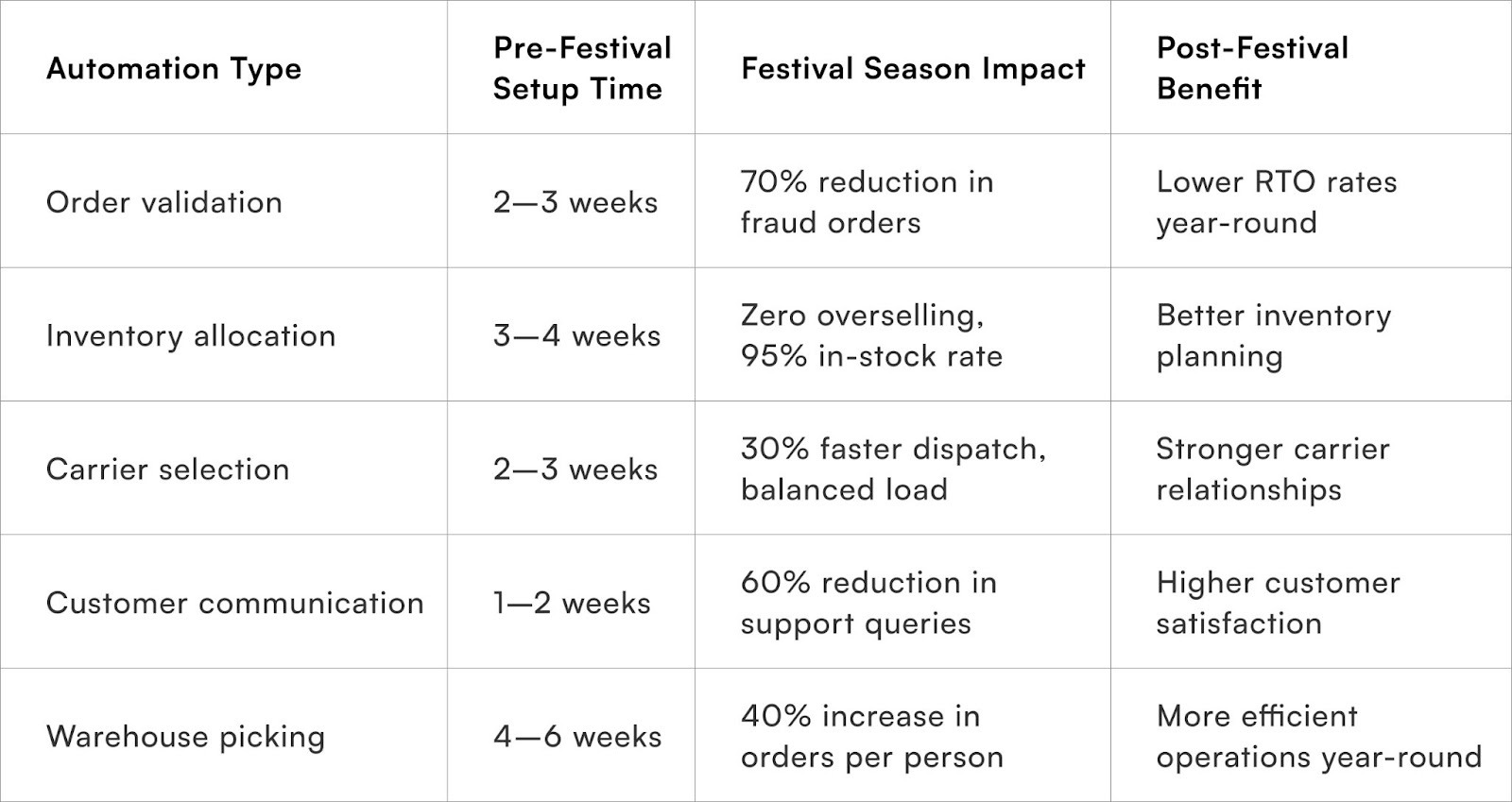
Quick Wins
Implement automated order confirmation and shipping notifications. Most OMS platforms support this out of the box. Turn it on. Write clear message templates. Test with 50 orders to ensure triggers work correctly. This alone reduces "Where is my order?" queries by 40%.
Automate fraud detection for high-risk order patterns. Use your existing order data to identify fraud signals: orders from blocklisted phone numbers, COD orders above ₹5,000 from new customers in high-RTO pincodes, multiple orders from same IP. Flag these for manual review instead of auto-accepting. Reduces fraud losses by 50–60% immediately.
Set up low-stock alerts in your inventory system. Define thresholds for each product (usually 20% of expected festival demand). When stock hits the threshold, system emails your procurement team. This gives you 48–72 hours to reorder before running out completely.
Build a simple carrier performance dashboard. Track on-time delivery rate, RTO rate, and average delivery time by carrier weekly. During festival season, check this daily. Use it to reallocate orders to better-performing carriers in real time rather than waiting for monthly reviews.
Metrics That Matter
Order processing time (order placement to dispatch): Measure median time in hours. Target: under 24 hours during festival season. If it crosses 36 hours, you have a bottleneck somewhere. Automation should keep this metric stable even as volume spikes 5X.
Customer query rate per 100 orders: Number of inbound customer queries divided by orders placed, multiplied by 100. Target: under 15 queries per 100 orders. If you're at 30+, your proactive communication is insufficient. Good automation reduces this to 8–12 even during surges.
Automation coverage rate: Percentage of orders processed without any manual intervention (validation, carrier selection, inventory allocation all handled automatically). Target: 85%+ during festival season. The remaining 15% need manual handling due to exceptions, but most should flow through automated systems.
Operational cost per order: Total ops team cost (salaries, overtime, temporary staff) divided by orders fulfilled. Track this monthly. Automation should keep this metric flat or declining even as volume increases. If it rises during festival season, you're scaling headcount instead of automation.
Stockout rate during peak days: Percentage of products that went out of stock on your highest-volume days. Target: under 5%. If you're at 15–20%, your inventory automation and demand forecasting need improvement. Products going out of stock mid-festival is lost revenue you can't recover.
To Wrap It Up
Festival season surges don't break operations—manual processes do. Automation isn't about replacing your team, it's about giving them superhuman capacity to make thousands of correct decisions per day. Identify your highest-volume manual processes this week and map them for automation before your next surge.
Start with small wins—automated order notifications, fraud flagging, carrier selection. Build systems incrementally over 8–10 weeks before peak season. Test ruthlessly. Create fallback processes for when automation fails. The brands that thrive during festival surges built their automation infrastructure six months earlier, not during the chaos itself.
For D2C brands seeking comprehensive surge management, Pragma's operations automation platform provides intelligent order routing, real-time inventory allocation, and multi-carrier orchestration that help brands handle 5–10X order volume spikes without proportional increases in operational costs or team size.

FAQs (Frequently Asked Questions On The Role of Automation in Handling Festival Season Surges)
1. How much should I invest in automation for festival season if I'm a small brand?
Start with low-cost or no-cost automation first. Most OMS platforms include basic automation features you're not using—order confirmation emails, shipping notifications, low-stock alerts. Activate these before investing in custom solutions.
For brands shipping under 5,000 orders monthly, spend ₹50,000–₹1.5 lakhs on automation tools. For brands shipping 10,000–30,000 orders monthly, budget ₹2–5 lakhs. Focus on automating high-impact processes: customer communication, fraud detection, and carrier selection deliver the best ROI.
2. Should I build custom automation or use off-the-shelf tools?
Use off-the-shelf tools unless your requirements are genuinely unique. Platforms like Shopify, WooCommerce, Unicommerce, and Vinculum offer built-in automation for most D2C needs.
Custom development takes 3–6 months and costs 5–10X more. Build custom only if you've maxed out existing tools and have specific workflow needs no platform addresses. Most brands think they need custom automation but actually just need better configuration of existing tools.
3. What happens if my automation fails during the festival surge?
Build fallback processes for every automated workflow. If your carrier selection automation fails, default to a pre-defined carrier assignment (usually your most reliable carrier). If your inventory system goes down, pause online sales temporarily rather than accepting orders you can't fulfil. If your chatbot fails, route all queries to human support immediately. Automation should have circuit breakers—when it detects failures, it should fail safely, not silently.
4. How do I train my team to work with automated systems?
Start training 4–6 weeks before festival season. Your team should understand what the automation does, when to trust it, and when to override it. Run simulation exercises—process 200 dummy orders through the automated system whilst your team watches.
Show them how to handle exceptions that automation flags. Create simple SOPs: "When automation flags an order for fraud, check these three things before approving." Most automation failures happen because teams don't trust the system and override it incorrectly.
5. Can I implement automation during the festival season itself?
No. Implementing automation during peak season is extremely risky. Systems need testing, teams need training, and bugs need fixing—all impossible when you're processing 3,000 orders daily.
If you haven't automated before festival season starts, don't start during it. Instead, hire temporary staff to handle manual processes, survive the season, then implement automation immediately after. Use the post-festival period (December-February) to build and test for next year.
6. How do I measure ROI on automation investments?
Track three metrics: operational cost per order (should decrease or stay flat as volume increases), customer query rate per 100 orders (should decrease 30–50%), and time from order placement to dispatch (should stay under 24 hours even during surges).
Calculate saved labour costs—if automation handles work that would require 5 additional full-time staff, that's ₹15–20 lakhs saved annually. Also factor in opportunity cost—automation lets your team focus on strategic work instead of repetitive tasks.
7. Should I automate returns processing the same way as forward logistics?
Yes, but returns need different automation logic. Forward logistics optimises for speed—get orders out fast. Returns optimise for accuracy—ensure returned items are actually resaleable before refunding.
Automate return initiation, return pickup scheduling, and refund processing, but keep quality inspection human. A damaged item incorrectly marked as resaleable goes back into inventory and causes customer complaints when shipped to the next buyer. Automate the workflow, but humans verify the product condition.
Talk to our experts for a customised solution that can maximise your sales funnel
Book a demo.jpg)

.png)
.png)